Hidden Line Rendering
Hidden Line rendering displays your model as black-on-white line art (edges and silhouettes) or a surface mesh. The rendering may be saved in postscript or encapsulated postscript formats.
To create hidden line output:
-
Click the Settings  button in the Render group on the View ribbon.
The Rendering dialog appears.
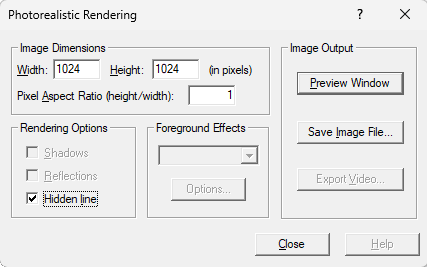
-
Click the checkbox for Hidden line to select it.
-
Click the Preview Window button.
The hidden line output appears in the preview window.
To save the hidden line output:
-
Click the Settings button in the Render group on the View ribbon.
The Rendering dialog appears.
-
Click the Save Image File… button.
The Save As dialog appears.
-
Select the file location and file type (*.ps or *.eps) and enter a filename. Click the Save button to save the file.